The traditional audit goes like this: export a list, print it, walk around with a pen, then spend a day typing corrections back in. By the time the spreadsheet is updated, it is already slightly wrong. There is a better way, and it does not require a large project.
Why spreadsheet audits fail
A printed list is out of date the moment it leaves the printer. People tick the wrong row, write notes in the margin that no one can read later, and skip the items that are hard to reach. Then someone re-types the results, and every typing step adds errors. The whole process rewards finishing quickly rather than finding the exceptions, which are the reason you audit in the first place.
Decide what an audit proves
An audit confirms that an asset exists, is where the record says, and is in the condition the record says. Each asset gets a date of the last check and a date for the next one. Everything else is a bonus.
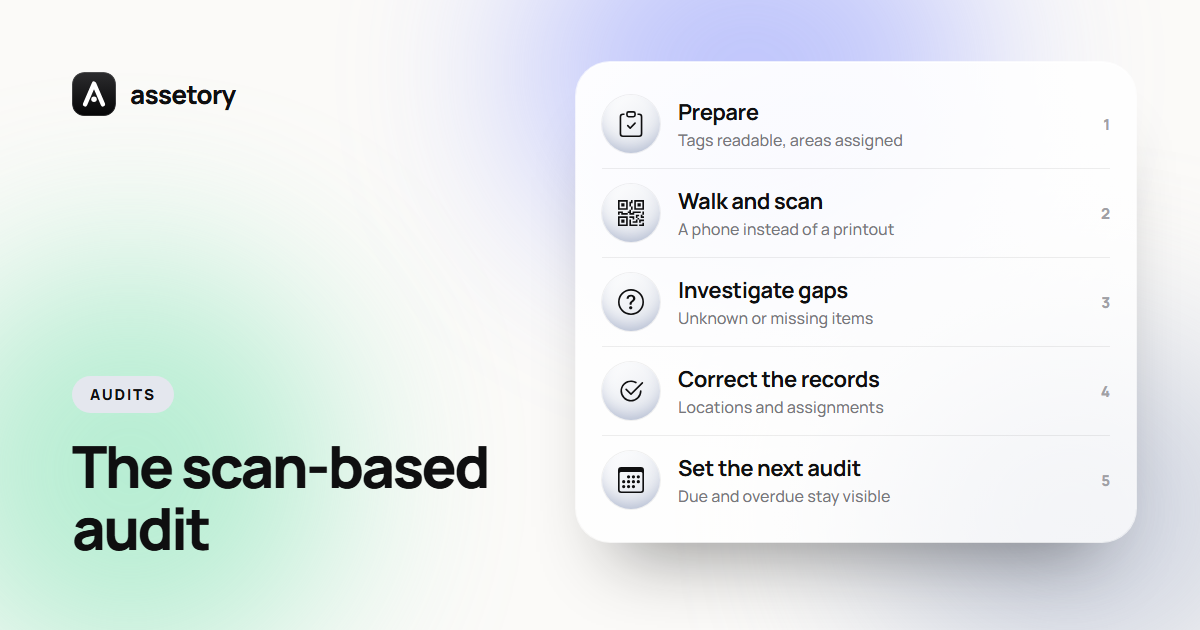
Prepare before you walk
- Make sure every asset carries a readable tag or code.
- Clean up obvious errors first, such as duplicate tags and assets with no location.
- Split the building into areas and assign one person to each.
- Give people a phone or scanner instead of a printout.
Choose the scope and the schedule
You do not have to audit everything at once. Start with the assets that carry the most risk or value: laptops, phones, servers and anything that leaves the building. Audit those more often, perhaps every six months, and audit low-value items yearly or when they are moved. A rolling schedule, where a few areas are checked every month, spreads the work and keeps the register fresher than one heroic annual exercise.
Walk and scan
Scanning beats ticking a list for a simple reason: it also finds things the list does not know about. An item that scans as unknown, or in the wrong place, is exactly the exception you are looking for. Note it on the spot rather than trying to remember later.
An item that scans as unknown, or in the wrong place, is exactly the exception you are looking for.
Work area by area, and finish one before starting the next. Check things people forget: devices in cupboards, in meeting rooms, under desks, and in the bags of people who work from home. If a tag is damaged, replace it during the walk so the next audit is easier.
Close the gaps
After the walk, compare what was scanned against what should exist. The missing items are your follow-up list. Most turn up within a day: lent to a colleague, moved to another room, or sent for repair without a note.
- Scan every asset in an area and add a note for anything odd.
- Correct locations and assignments as you find differences.
- List assets that were not scanned and ask the last known holder.
- Mark anything truly lost with the right status, and record what happened.
- Set the next audit date for each asset you verified.
Audit remote and hybrid teams
Not every asset sits in the office. For laptops and phones that live at home or travel with people, a walk is not possible. Ask each person to confirm their devices by scanning the tag with their phone or sending a photo of the label and the serial number. Treat it as a quick self-check once or twice a year, and follow up with anyone who does not reply. The record is updated the same way as in an office audit, and the confirmation is stored as part of the asset's history.
Turn findings into fixes
An audit that only produces a list of problems is half finished. Look for patterns. If many devices are in the wrong location, your check-in process is not capturing moves. If labels keep coming loose, change the material. If one team is always missing items, ask why. Each finding should lead to a change in how assets are handled, so the next audit finds fewer problems.
Make it routine
Audits work best as a small, regular task, not an annual event. If each asset has a next audit date, you can see which ones are due or overdue and tackle them in small batches.
Common questions about asset audits
How often should we audit?
For laptops, phones and other portable, high-value items, every six months is a good starting point. Fixed or low-value assets can be checked yearly. Let each asset carry its own next audit date, so the schedule follows the risk rather than the calendar.
How long does a scan-based audit take?
Much less than a list-based one. A person with a phone can scan dozens of assets in an hour, and there is no typing back afterwards. The time you save goes into the part that matters: investigating the items that did not match.
What if an asset cannot be found?
First ask the last known holder and check the usual hiding places. If it still cannot be found after a set period, mark it with a lost status, record the circumstances, and decide with finance whether it should be written off. Keep the record; it is the evidence of what happened.
Do we need a special scanner?
No. Most teams start with the phones they already have. A dedicated scanner becomes worthwhile only when you audit very large numbers of items in one sitting, such as a warehouse or a data centre.
Who should do the audit?
Ideally someone who does not manage the assets day to day. A fresh pair of eyes finds more exceptions, and it keeps the audit honest. Pair them with a person who knows the area, so the walk goes quickly.
What should we do with the results?
Share a short summary with the people who own the areas: how many assets were checked, how many matched, and what was missing or in the wrong place. Keep the detail in the asset history so the next audit can compare against it. A visible result makes the next audit easier, because people see that the effort led to something.
Want to see this in practice? Explore Audits in Assetory, or book a demo.