Teams starting an asset register tend to make the same mistake: they design a record with forty fields, fill in six of them, and give up by spring. A record only helps if it is kept current, so start with the smallest one that answers the questions you will actually ask.
Why small records win
Every field you add is a field someone must fill in, check and keep accurate for the life of the device. Multiply that by hundreds of assets and the cost is real. Fields that are half-empty are worse than missing fields, because they look like data and mislead whoever reads them. A small record is faster to create, easier to audit and far more likely to be true.
The questions a record must answer
- What is it, and which one is it?
- Who has it, and where is it?
- What condition is it in, and is it usable?
- What did it cost, and when does its life or warranty end?
The ten fields
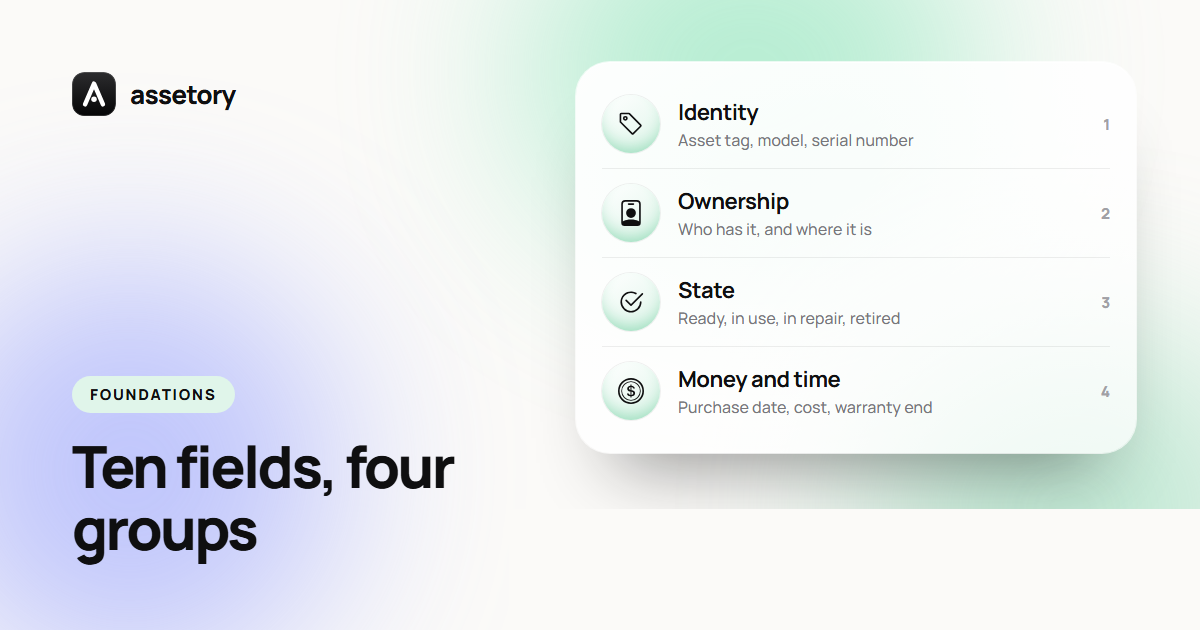
Those questions translate into a short list. Identity: a unique asset tag, the model, and the serial number. Ownership: who it is assigned to and its location. State: a status such as ready to deploy, in repair or retired. Money and time: purchase date, purchase cost, and warranty or end-of-life date.
Add a supplier and an order reference if you buy from several places. Everything else can wait until you find yourself needing it.
Why each field earns its place
- Asset tag: the one number people use to talk about the device. Without it, everything else is guesswork.
- Model: carries the manufacturer, category and expected lifespan, so you do not repeat them per unit.
- Serial number: proves which physical unit you mean, and is what the manufacturer asks for in a warranty claim.
- Assignment and location: the answer to the question you will be asked most often: who has it, and where?
- Status: tells you whether a device can be handed out, is being repaired, or has left service.
- Purchase date and cost: the basis for depreciation and for replacement planning.
- Warranty or end-of-life date: the date that turns into a reminder before it turns into a bill.
Choose models once
Most of the detail about a device belongs to its model, not to the individual unit. Define the model once, with its manufacturer, category and lifespan, and every unit inherits it. This keeps data consistent and makes each new entry quick, which is the real secret of a register that stays current.
A record only helps if it is kept current.
Statuses that people actually use
Statuses decide whether the register is trusted, so keep the list short and clear. A handful is enough: ready to deploy, in use, in repair, lost or stolen, and retired. Write one line explaining each, and make sure everyone uses them the same way. If two people interpret "in repair" differently, the status stops meaning anything and the lists built on it stop being reliable.
Add fields only when a decision needs them
Before adding a field, name the decision it will inform. If you cannot, skip it. "Which department's budget pays for this?" is a decision. "Colour" usually is not.
When a real need appears, such as a cost centre for charge-backs or a lease end date, add the field once and fill it for the assets that need it, rather than for everything. Review the extra fields each year and remove any that nobody has used.
Start from the spreadsheet you already have
You do not need to begin with a blank register. Most teams already have a spreadsheet with a rough list of devices. Clean it up before importing: remove duplicate rows, make sure every serial number appears only once, and use the same wording for models and locations. Then import, and fix the gaps device by device as you touch them. A register that starts at 80 percent accuracy and improves is better than one that waits for perfection.
- Write down the five questions you ask most about equipment.
- Check that your record answers each one directly.
- Remove or ignore any field that none of them needs.
- Import your existing list and fix the gaps device by device.
- Revisit the field list after three months of real use.
A small record that is true today beats a large one that was true last year.
Common questions about asset records
Should we record the price of every accessory?
Not individually. Track accessories as counted stock with a quantity and a minimum level, and keep the detailed record for items that have a serial number, a real cost or a person responsible for them.
How do we keep the record accurate over time?
Make the record part of the work. Every handover, repair and move should update it on the same day, and a regular audit catches what slips through. People keep records current when doing so is quicker than not doing it.
Who is allowed to edit the record?
Give edit rights to the few people who handle assets daily, and read-only access to everyone else who needs to look. Fewer editors means fewer inconsistencies, and an activity log shows who changed what if you need to find out.
Can we change the fields later?
Yes, and you should. Start with the ten fields, run for a quarter, and then add or remove fields based on the questions people really asked. A record that grows from real needs stays small and useful.
What about assets that are not IT equipment?
The same ten fields work for furniture, tools and vehicles, with small changes. Swap the serial number for a chassis or equipment number where it makes sense, and add a field for any inspection date that the law requires. Keep the core record the same so one set of reports covers everything.
How do we decide the right level of detail for each category?
Match the detail to the cost and the risk. A laptop that holds company data deserves a full record. A box of cables does not. Write down your rule, for example "individually track anything over a set value or with a serial number", and apply it consistently so that everyone knows what belongs in the register.
Want to see this in practice? Explore Hardware assets in Assetory, or book a demo.